

Canteen and transport
Optional daily payments for canteen and the school bus. They are never added to the term bill.
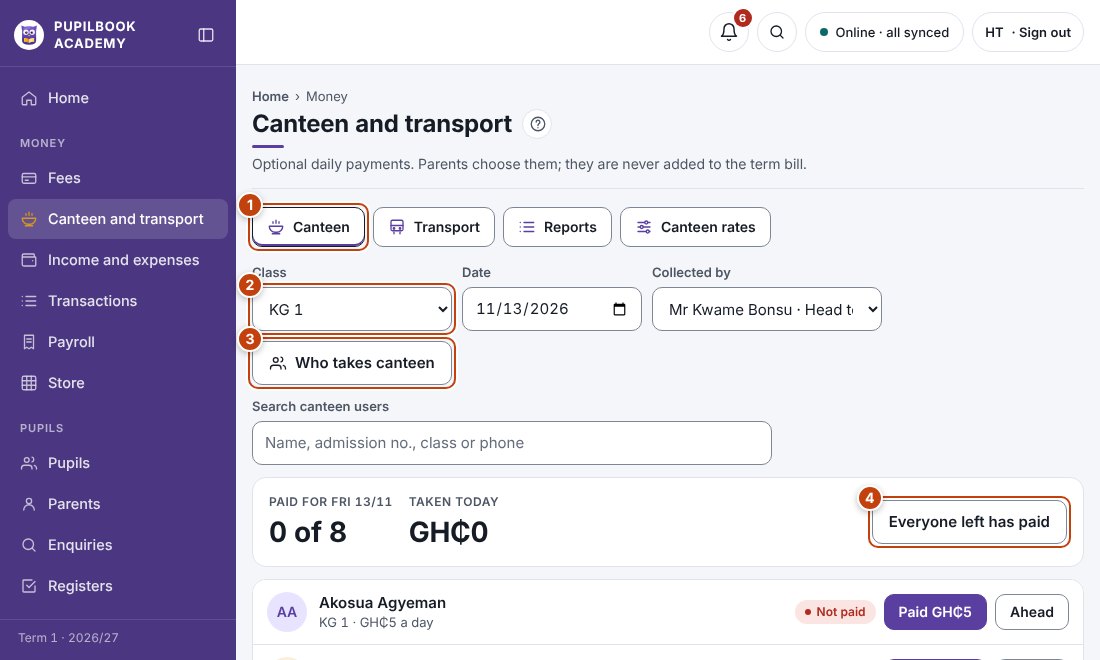
In the picture: 1 Canteen or transport · 2 Choose the class · 3 Who takes canteen · 4 Everyone left has paid.
Take today’s canteen money
Section titled “Take today’s canteen money”- Open Canteen, pick the class and check the date.
- Choose who collected the money.
- Click Paid next to each pupil who paid, or Ahead if they paid for several days.
- Everyone left has paid marks the rest in one go.
Bus fares
Section titled “Bus fares”- Open Transport and pick a route, or All routes.
- Mark each pupil Paid as above.
Choose who takes canteen or uses the bus
Section titled “Choose who takes canteen or uses the bus”- Click Who takes canteen or Who uses transport.
- Search for the pupil, tick canteen or choose their route, then save.
Find a pupil
Section titled “Find a pupil”Type a name, admission number, class, route or phone in the search box. On Canteen a search covers every class.
Change rates and fares
Section titled “Change rates and fares”Click Canteen rates or Routes and fares.
- Reports shows totals by class, by route and by who collected.