

Registers
Morning registers for pupils and staff.
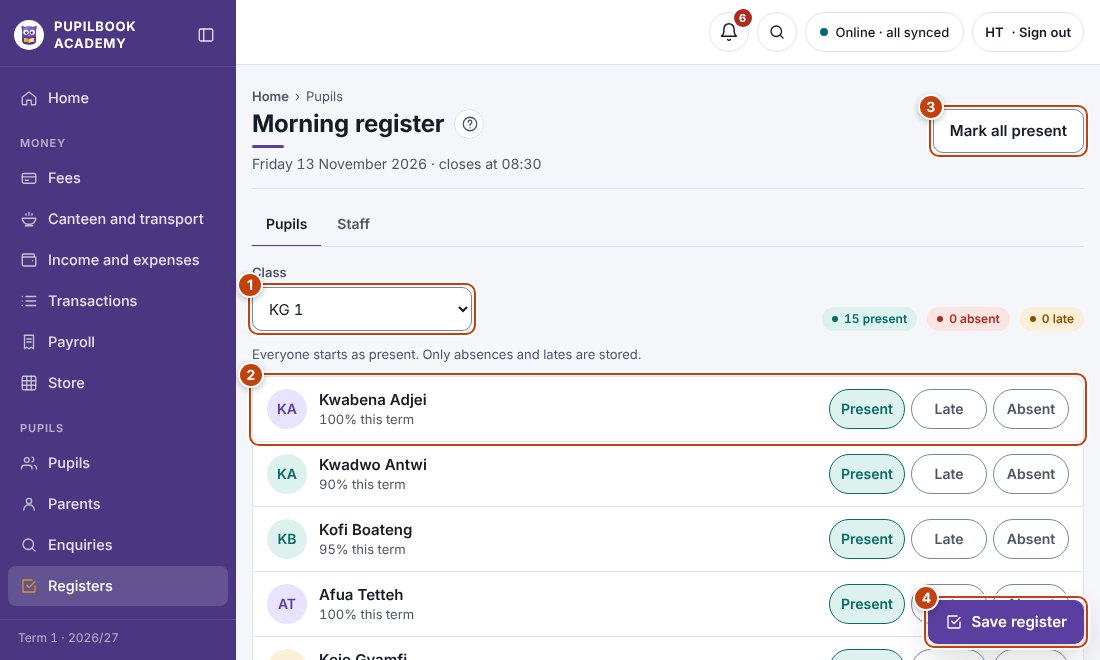
In the picture: 1 Choose the class · 2 Tap Late or Absent for a pupil · 3 Mark everyone present · 4 Save the register.
Take a register
Section titled “Take a register”- Pick the class.
- Mark each pupil Present, Late or Absent. Mark all present is quicker when most are in.
- Click Save register before closing time.
Staff register
Section titled “Staff register”Open the Staff tab, mark each person, then save.
- Parents of absent pupils get a text automatically if absence alerts are on in Messages.
- No internet? The register saves on the device and sends when you are back online.